Being the apple a day for a fledgling health startup.
Building a visual identity for a brand and designing an early app concept.

Care Compass is a health and lifestyle company with an app geared towards tracking various fitness metrics (steps, water intake, sleep quality, etc.). They were in need of a visual identity, and to be able to apply said identity to early app concepts. We created a style tile to establish the company’s visual aesthetic, and then used that to build out a high-fidelity prototype. I was the lead on the project, spearheading research into both branding and competition in the industry. I also ran point on creating the high-fidelity prototypes.
BACKGROUND
Care Compass gave me a pretty well-defined concept to build from in terms of what the app’s key features are, as well as who their target audience is. Beyond that, I was pretty much on my own. Before I even considered diving into the design of the application, I first needed to understand the brand, then develop a cohesive visual identity for it.
Health and fitness apps are a very competitive market, so naturally I’d need to have a good grasp on what currently exists, so that I could help Care Compass stand out in a sea of competitors. I started off by building out a perceptual map, along with researching commonly used brand archetypes in the space. Since Care Compass is trying to appeal to a pretty broad audience,
I also wanted to make sure that the look of the brand and app would be approachable for the masses, while still feeling established and having a sense of trustworthiness, since the last thing you want a health app user to do is question your ability to guide them on fitness.
User Personas
I was provided with three personas to keep in mind while working on this project: the Health Enthusiast, the Busy Professional, and the Health-Conscious Parent. While they each represent a unique group that Care Compass hopes to appeal to, there is a common thread in that they all want to better their own health. How that’s achieved, though, is where they diverge pretty dramatically.


The Health Enthusiast, for example, Is always looking for something new in their workouts, and likes to do challenges with others. Meanwhile the Busy Professional, on the other hand, needs to find time to work out in the first place, made more difficult by the fact that their schedule is flexible and their time is pretty limited. Similarly, the Health-Conscious Parent needs to be able to check her family’s progress at a glance, since she’s concerned about multiple people in her household and can only dedicate a few minutes a day to opening the app.
DESIGN DEVELOPMENT
Mood Boards
When it came to developing Care Compass’ style, I used the tried-and-true KISS method; complex or intricate design wasn’t necessary in this context. I wanted to achieve a lot with a little, so having a solid framework that was easy to understand but flexible enough to adapt was a must.
I started with a few mood boards, each with a specific purpose. I made a mood statement with each of the provided user personas in mind, and then created a corresponding board.
I also created a couple more mood boards that reflected two common brand archetypes in the health space – the Sage and the Caregiver.


Brand Identity Development
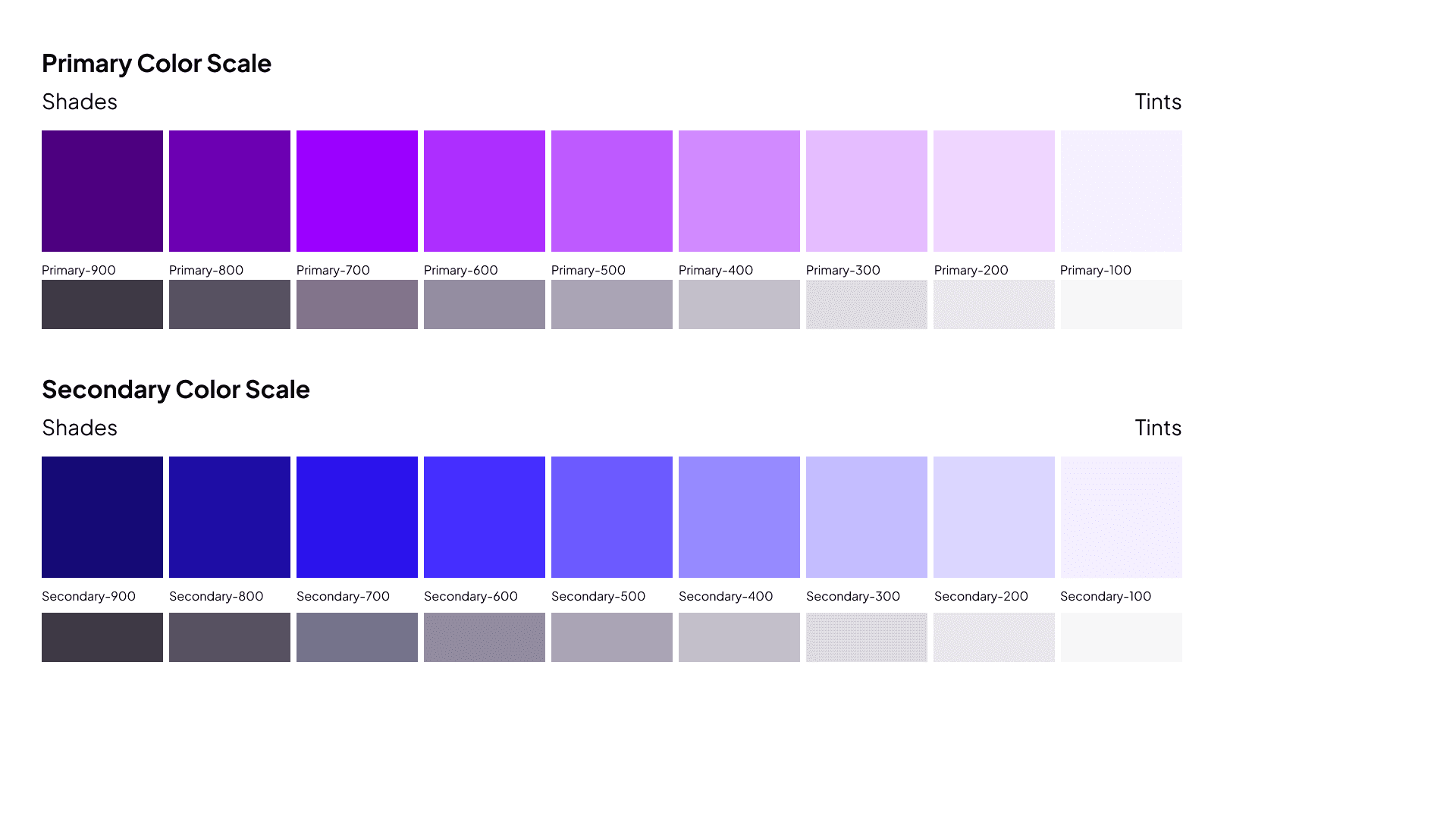
The persona mood boards helped me figure out what I wanted to achieve with giving visual appeal from a user’s perspective, while the archetype mood boards gave be a better understanding of what defines certain health brands. Ultimately, I landed on a set of cool tones for the main color palette.
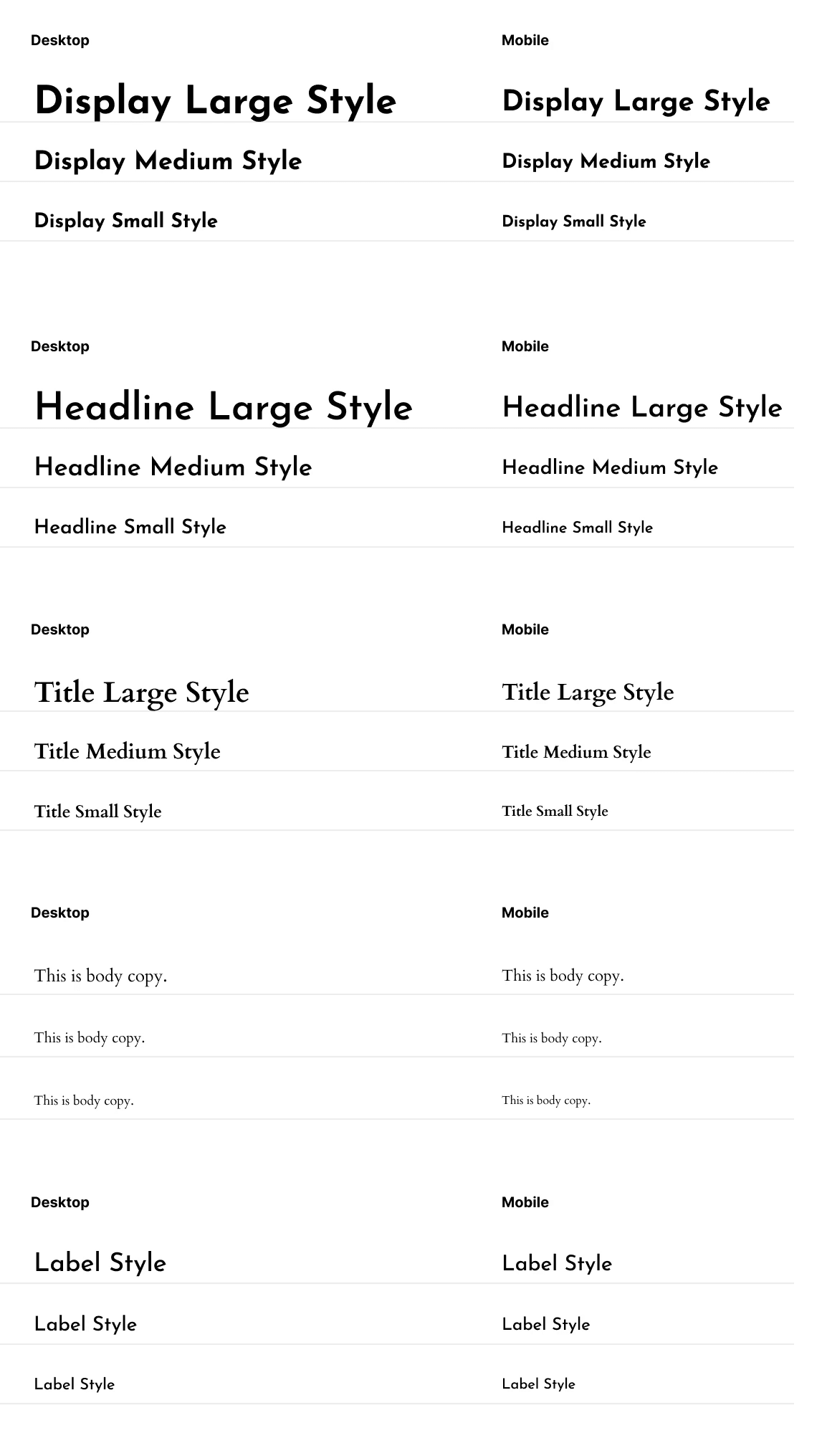
When it came to the logo, I developed a logotype that replaced the “O” in Care Compass with an actual compass. The type is set in Josefin Sans Bold, a really clean Sans Serif font that I felt really captured the essence of what to expect from a health app. Josefin also worked quite well for the various type styles I would need for the app.
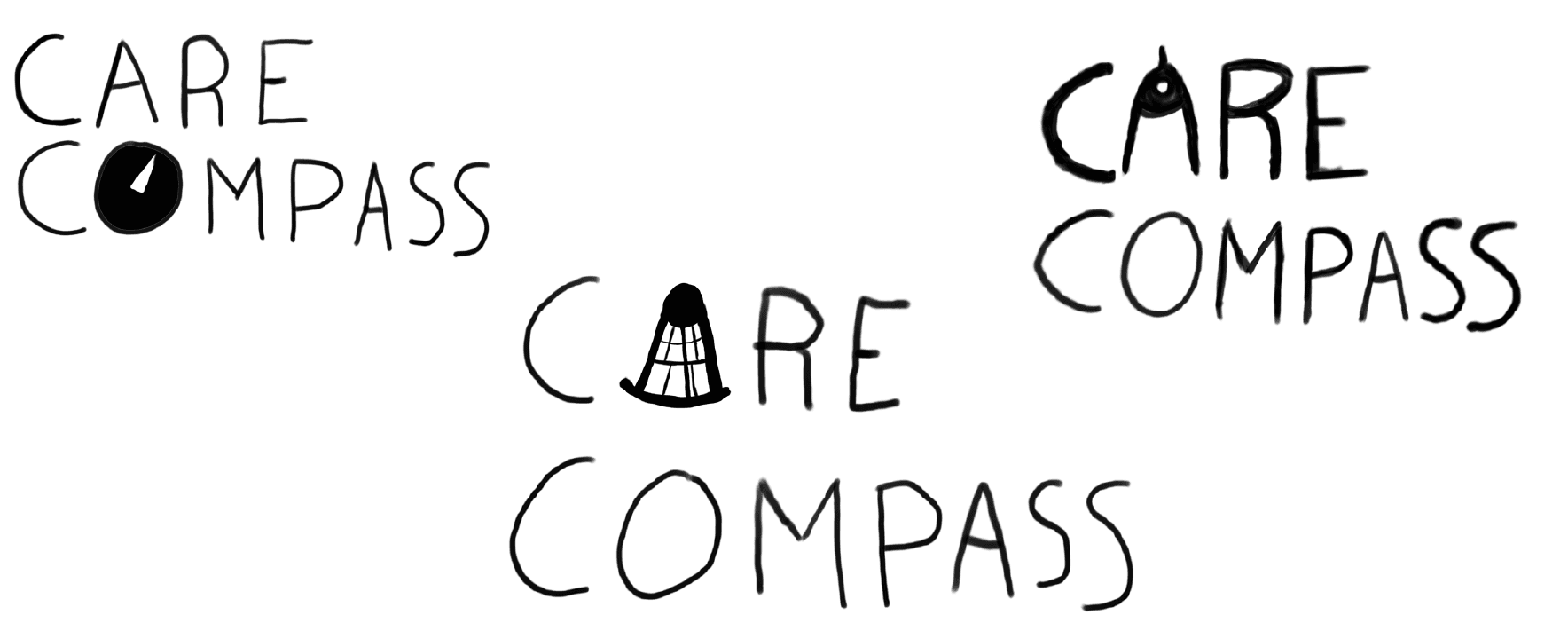
The logo went through a few different iterations before I got to the version I was satisfied with. I knew I wanted to incorporate a navigational tool into the name, so I experimented with using both a geometric compass and a sextant to replace the letter “A” in Care, before deciding on the compass seen in the final design.

To me, the cool tones achieved a calm, knowledgeable vibe that really makes Care Compass feel trustworthy and well-established, despite the company being in its infancy.
UI/Layout Design
Wireframes
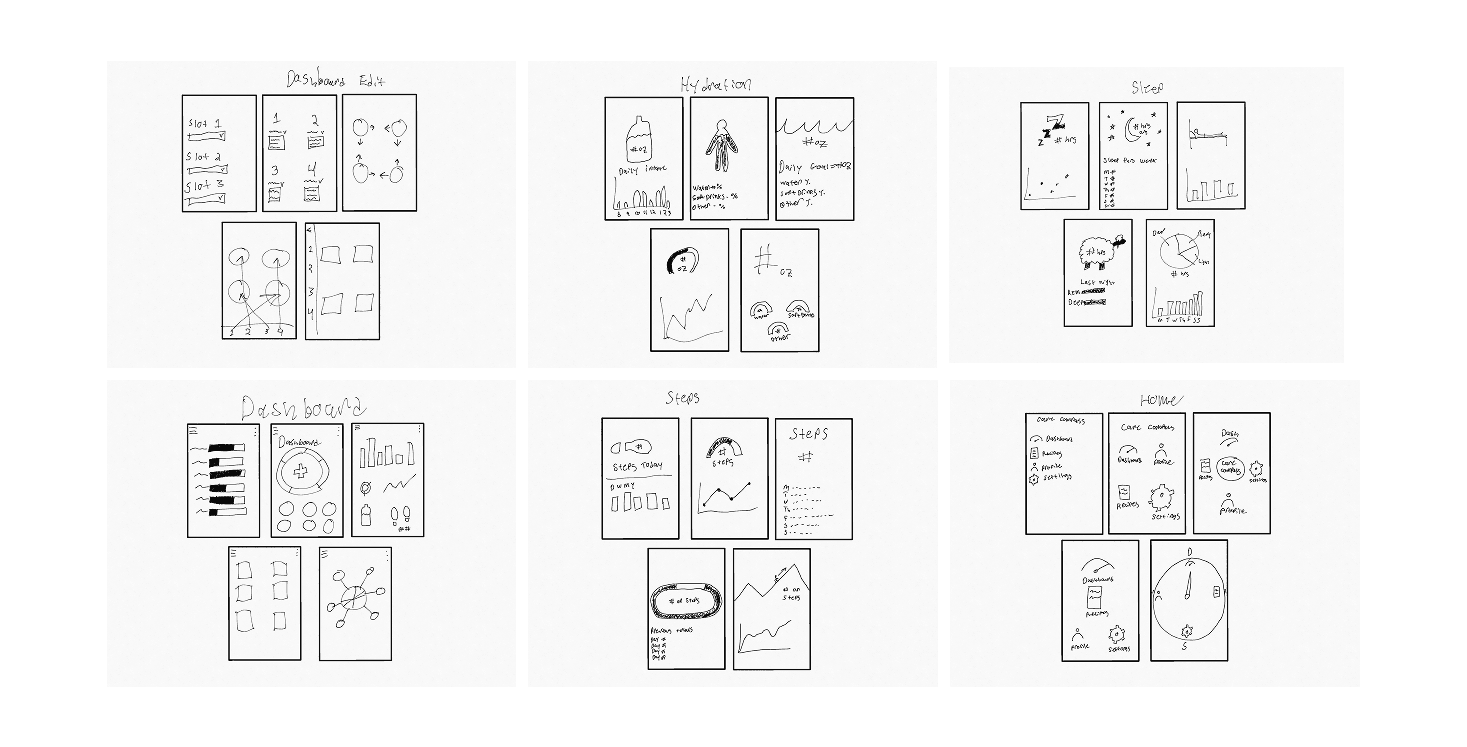
After establishing the visual identity, it was time to move on to building a prototype. I decided the dashboard would be a good place to start, since this is where our users would ideally spend the majority of their time. The dashboard is meant to be customized to the user’s needs, and show key health metrics at a glance. I wanted to build something that accomplished this, while also maintaining the simplicity and approachability I was looking for. I started with sketching some ideas for layouts and visual elements; I took inspiration from existing health apps, but also experimented with thematically relevant ideas. Some were admittedly a bit silly (i.e. using a sheep for the sleep tracking page), but in early stages like this, limiting creative thoughts only hurts in the long run.
Most commonly, a compass you might find in the real world is circular. That shape’s roundness was a big source of inspiration in the final prototype; Icons, graphs, and other visuals have rounded corners, or feel as if they could fit well inside of a circle. The main dashboard page itself prominently features a ring at the top, meant to give an at-a-glance look at the day’s fitness metrics, akin to the activity rings on the Apple Watch.
Keeping customization in mind, the lower portion of the dashboard features icon-based shortcuts to various health metrics. Tapping on them takes the user to the relevant screen, where the quantity is shown, along with a graph showing totals from the last 5 days. Alternatively, the user can long press any of the icons, or tap a plus button on the lower row to enter an edit mode. From there, users can rearrange the icons to the order they see fit, or add another icon for a metric of their choice, allowing another item to be quickly accessed.
Hi-Fi Prototypes
Once I settled on a layout that felt right, I transitioned my work over to Figma and began to start developing a digital prototype.

After presenting this prototype to stakeholders, the biggest takeaway was that the design was ultimately too simple. While my icon-based interactions were along the lines of what they were looking for, the severe lack of accompanying text worked to my detriment and, ironically, made navigation unclear.
I unfortunately was unable to conduct user testing due to time constraints, which more than likely would have alleviated the chief complaint, or at the very least helped me correct course on my design before presenting it as final.
Perhaps most notably, I received feedback that the ring I implemented on the main dashboard did not clearly convey its purpose to the user. The cross sitting in the center of it was a large contributor to this confusion, as some individuals thought its presence made the overall element look too similar to the plus buttons on the lower portion of the page, rather than just a visual compliment to the ring.
Next Steps
While I am disappointed in the outcome, I am not deterred from building on Care Compass’ design. Since no user testing was conducted during the duration of the project, making it the next step, in my mind, is the most logical option.
I would like to conduct A/B testing on text-supported icons vs. icons only to help understand the impact that one has on navigation over the other. I’d also like to add more functionality to the prototype, namely building out the full experience of adding an additional icon to the quick menu on the dashboard. Lastly, I am curious about adding more visual flourish; I wonder if the incorporation of gradients and texture into the design would help or hurt the visual appeal for the end user.
Ralph Waldo Emerson is famously attributed to the quote, “It’s not the destination, it’s the journey.” I found that with Care Compass, this could not be truer. From building the identity to creating a prototype, I learned that the path of simplicity is not always what is best for the user. Finding what is best, though… that’ll take some additional navigating.